Substance 3D Painter
Select Blender meshes and click Create Painter Project. REVO Bridge sends USD to Painter and returns exported textures to Blender materials. Create Low/High Bake additionally loads a high poly into Painter's baker; see Bake Project.
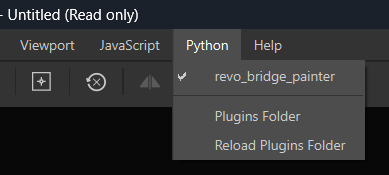
Install the Painter helper from Integrations, restart Painter, and enable
revo_bridge_painter from Painter's Python menu.
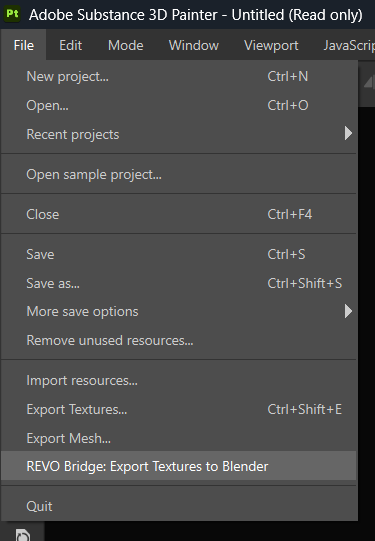
Use File > REVO Bridge: Export Textures to Blender when the project is ready. Blender auto-imports by default. Import Textures from Painter reapplies the latest Painter export.
The export uses the channels in the open Painter project. Normals return as OpenGL for Blender. Blender's USD export turns Principled BSDF materials into Painter Texture Sets, one per material.
REVO Bridge updates matching materials. For renamed Texture Sets, it creates and assigns a Blender material with the Painter name.
Settings (Utilities)
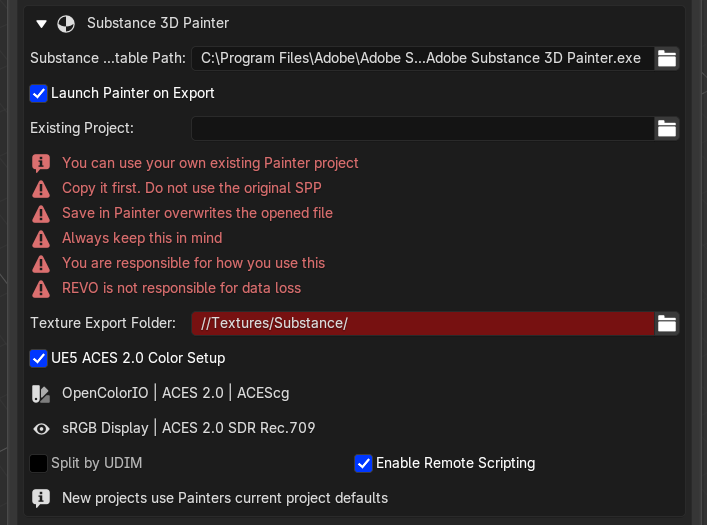
- Painter executable path
- Launch Painter on export
- Existing
.sppproject - Texture export folder
- Split by UDIM (Legacy)
- Use UV Tiles
- Normal Map Format
- Compute Tangent Space Per Fragment
- Auto-import textures from Painter
- Enable remote scripting at launch
- UE5 ACES 2.0 Color Setup
- Bake Project: Bake Resolution, Match By Mesh Name, Mesh Maps
Leave Existing Project empty for a new project. Select an .spp to reuse
its setup, such as a specific shader. REVO Bridge opens a working copy in the
Texture Export Folder (default: Textures/Substance beside the .blend).
Use a custom Painter project
Save the project, select it as Existing Project, then click Create / Update Painter Project.
Bake Project
Create Low/High Bake in the Painter box sends named high/low meshes to a new Painter project and loads the high poly into Painter's baker for you.
- Name meshes
asset_low/asset_highwith Name as Low / Name as High (the same convention as the Toolbag Baker). - Select the low and high meshes and click Validate Names.
- Click Create Low/High Bake, or Create Low/Low Bake to bake the low meshes onto themselves.
REVO Bridge exports the _low meshes as substance_bake_low.fbx and the
_high meshes as substance_bake_high.fbx, creates a new Painter project from
the low FBX at the Bake Resolution, sets the high FBX as the baker's
high-definition mesh and enables the chosen Mesh Maps on every Texture Set.
It does not start the bake: review the settings in Texture Set Settings,
adjust distances or cages, and click Bake selected textures yourself. The
Blender sidebar confirms when the baker is ready.
Match By Mesh Name bakes each _high mesh only onto the _low mesh that
shares its group name. It is always on when more than one bake group is
selected; with a single group you can turn it off to match every high mesh
against every low mesh.
Bake Project always creates a new project from FBX and ignores Existing Project. Paint on the baked project as usual, then use File > REVO Bridge: Export Textures to Blender; the baked Ambient Occlusion returns as part of that export.
UE5 ACES 2.0 Color Setup
Enabled by default for new projects. Requires Painter 11.0.3 or newer. Existing projects keep their own color-management settings.