Installation and Update
Supported and workflow-tested Blender versions: 4.2 through 5.2. Windows only (x64 and ARM64, including Snapdragon-based devices such as the Surface Pro).
Install in Blender
The ZIP is a Blender Extension package. Do not extract it before installing.
Drag-and-drop (Blender 4.2+)
- Open Blender.
- Drag
REVO_Bridge_Blender.zipinto the Blender window. - Confirm the install prompt.
- Open the REVO Bridge tab in the 3D View N-Panel (
N).
Install from Disk
Edit > Preferences > Get Extensions > Install from Disk, then choose REVO_Bridge_Blender.zip.
If an older REVO Sync extension is still enabled, disable and remove it first. Blender treats revo_bridge as a new addon.
After installation
- Confirm the REVO Bridge tab appears in the 3D View N-Panel.
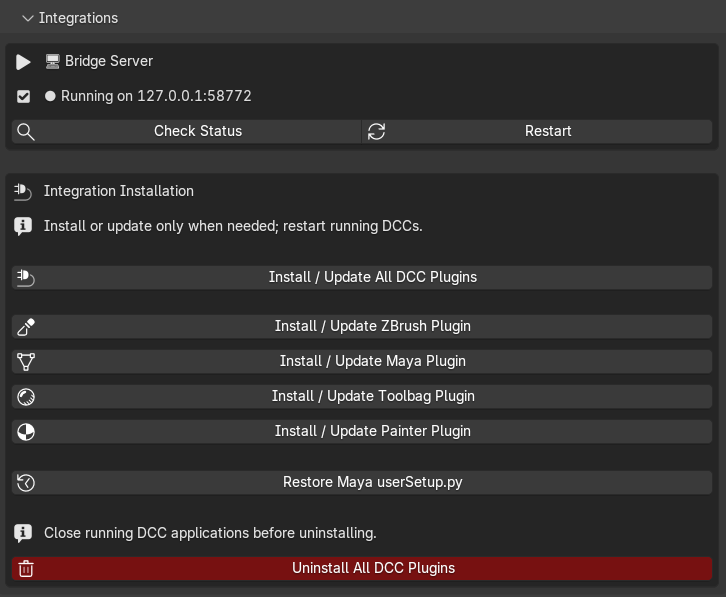
- Confirm the bridge server shows as Running (Auto-Start is on by default).
- Open Utilities and set each DCC executable path you use.
- Open Integrations and choose Install / Update All DCC Plugins.
- Restart ZBrush, Maya, Toolbag and Painter if they were already open.
Painter installs a Python helper plugin. Enable revo_bridge_painter from
Painter's Python menu after restarting it.
DCC plugin locations
| DCC | What gets installed | Where to look after restart |
|---|---|---|
| ZBrush | Compiled REVO_Bridge.zsc plus REVO_BridgeData/sync_dir.txt |
ZPlugin > REVO Bridge and the REVO Bridge palette |
| Maya | Plugin, shelf, scripts, managed userSetup.py block |
REVO_Bridge shelf; Plugin Manager: REVO_Bridge.py |
| Painter | Python plugin and transfer-folder configuration | Enable revo_bridge_painter in Painter's Python menu |
| Toolbag 5 | User plugin folder Revo_Bridge/__main__.py |
REVO Bridge window when Toolbag starts from Blender |
ZBrush 2026 loads .zsc at startup. A .txt left in the plugin folder is not compiled automatically.
The Maya installer follows the version in the configured executable path. A Maya 2026 path installs into the Maya 2026 user folder even if Maya 2027 is also present.
Update
- Install the new
REVO_Bridge_Blender.zipover the previous extension. - Run Install / Update All DCC Plugins once.
- Restart ZBrush, Maya, Toolbag and Painter so they pick up the new helpers.
An update also replaces leftover REVO Sync plugin files.
REVO Bridge makes a timestamped backup before changing Maya userSetup.py. Use Restore Maya userSetup.py in Integrations if you need the previous file.
Uninstall DCC plugins
Close ZBrush, Maya, Toolbag and Painter, then open Integrations and click Uninstall All DCC Plugins. Confirm the prompt and restart the DCCs.
Uninstall removes REVO Bridge plugin files and the managed block in Maya
userSetup.py. Projects, DCC preferences, backups, Blender materials, and
transfer-folder contents remain untouched.
Verify installation
- Blender: N-Panel tab REVO Bridge, server Running.
- ZBrush: ZPlugin > REVO Bridge after restart.
- Maya: REVO_Bridge shelf after restart.
- Toolbag: Create Bake Project or Export to Toolbag launches Toolbag with a REVO Bridge window.
- Painter: Create / Update Painter Project launches Painter with the USD.