Introduction
REVO Bridge Blender Addon
REVO Bridge is a Blender extension that sends selected meshes to other DCCs and brings them back. Each send writes files into a shared transfer folder. A local server in Blender watches that folder and coordinates export, import and auto-import.
It is not a live-link. You export, work in the other application, then send back.
Main features
- Send and receive meshes with ZBrush, Maya and Marmoset Toolbag 5
- Send USD to Painter and receive fully wired painted textures in Blender
- Export selected Maya character hierarchies through FBX or USD, including portable skeleton, skinning, blend-shape, and animation data
- One-click installers for the ZBrush, Maya, Toolbag and Painter helpers
- Configured Toolbag Baker projects from
_low/_highmeshes - Auto-import where the other app allows it. ZBrush receive is always a button. Toolbag only auto-imports from Blender when Blender launches Toolbag with the plugin; sending back to Blender needs Edit > Plugins > Revo_Bridge open. See First Use
- Localhost-only server with a private token (no public access)
What it does not do
- It is not a live-link; work in the other DCC, then send back.
- Cage painting and skew-map edits remain in Toolbag's Baker UI.
N-Panel
Use the N-Panel workflow:
- Open
3D View > N-Panel > REVO Bridge - Confirm the bridge server is running
- Set executable paths under Utilities
- Install DCC plugins under Integrations
- Select mesh objects, then Export / Import for the DCC you want
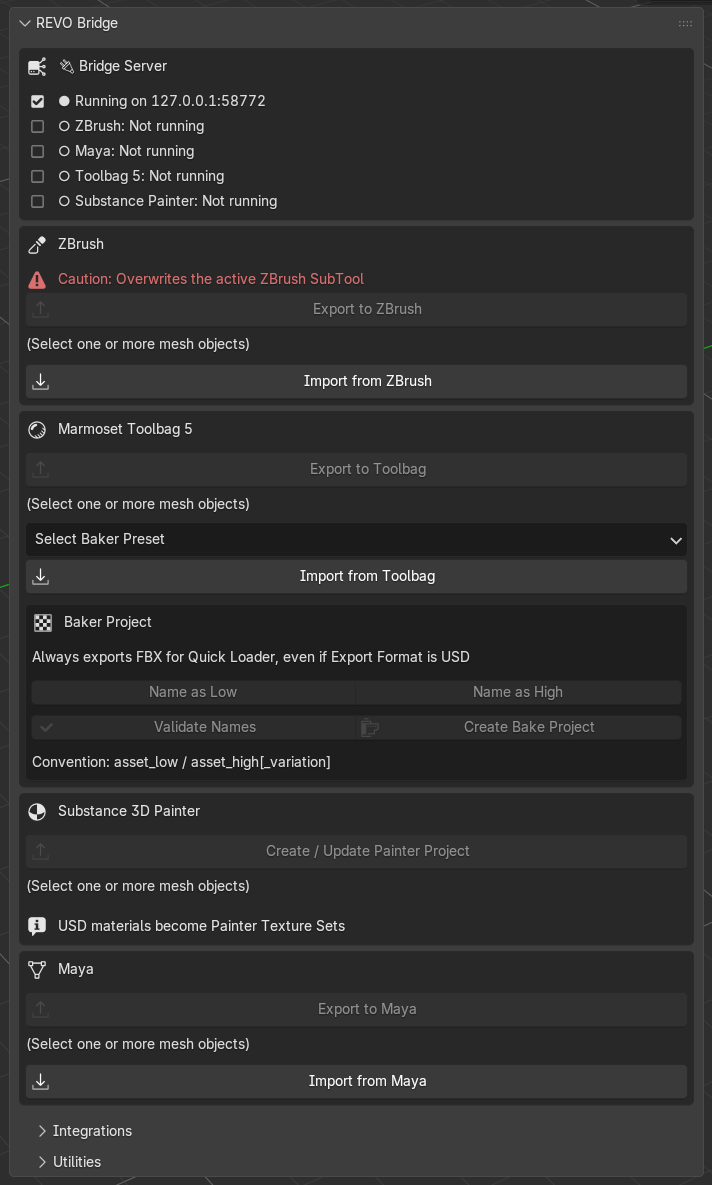
Main operators you will use
| Action | Notes |
|---|---|
| Export to ZBrush / Maya / Toolbag | Sends the current mesh selection |
| Import from ZBrush / Maya / Toolbag | Loads the last send waiting in the transfer folder |
| Create Bake Project | Names, validates and builds a Toolbag Baker |
| Create / Update Painter Project | Exports USD and opens Painter. Existing .spp projects are copied to a working file automatically |
| Install / Update All DCC Plugins | Copies helpers into ZBrush, Maya, Toolbag and Painter |
Required Blender version
- Supported and tested: Blender 4.2 through 5.2, Windows 10/11, x64 and ARM64 (verified on a Snapdragon-based Surface Pro)
- End-to-end tested with: Maya 2026/2027 (including rigs), ZBrush 2026, Toolbag 5, and Substance 3D Painter 11.0.3+ project and material exchange
- Add-on version: 1.1.1
- License: GPL-3.0-or-later (Maya shelf icons are CC0-1.0)
Verified compatibility
The following workflows were tested end to end throughout Blender 4.2–5.2:
| Integration | Verified workflow |
|---|---|
| ZBrush 2026 | Blender export and ZBrush return import |
| Marmoset Toolbag 5 | Import/export in both directions and material exchange |
| Maya 2026/2027 | FBX/USD import/export, including character rigs |
| Substance 3D Painter 11.0.3+ | Project creation, mesh import, baked/painted texture export, and Blender material setup |